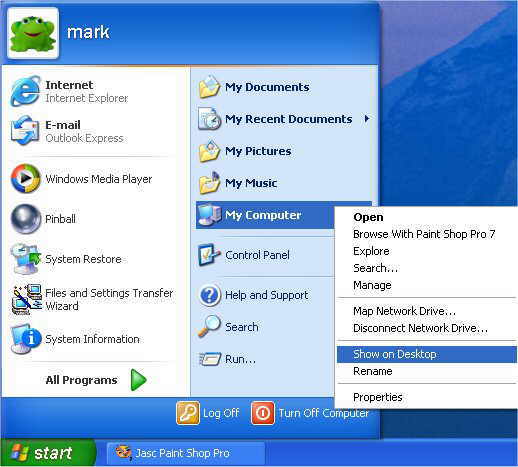
The Example we will
use is to add "MY COMPUTER" shortcut back to the desktop.
Unlike other Windows Operating systems this has been removed by default.
The Only Icon that is on the Desktop is Recycle Bin. There is two
methods both are listed below.
-
So click on
"START" then "ALL PROGRAMS" then right click on
"MY COMPUTER" and then left click on "SHOW ON
DESKTOP". The shortcut for "MY COMPUTER" has now been
added. (See Picture Below)
-
If you want to send
another program then if the option "SHOW ON DESKTOP" is
not listed then right click on the program you wish to have on the
desktop, left click on "SEND TO" then left click on
"DESKTOP (CREATE SHORTCUT). This will now add the shortcut for
the software to your desktop.